Showing posts with label Android Market. Show all posts

Tuesday, March 6, 2012

Introducing Google Play


[This post is by Kenneth Lui, Android Developer Ecosystem. —Dirk Dougherty]

For more than a year we’ve been focused on expanding the reach, content, and monetization opportunities of Android Market. We started by extending the store to users on the web and then went on to add books, movies, and music. The number of people who have visited, registered, and downloaded from the store has been amazing.


Today we’re launching Google Play, an integrated destination for apps, books, movies, and music, accessible to users on Android devices and to anyone on the Web. As part of this launch, Google Play replaces and extends Android Market — users everywhere can now find their favorite apps and games in Google Play, with other digital content, all in one place.


We believe that with a strong brand, compelling offerings, and a seamless purchasing and consumption experience, Google Play will drive more traffic and revenue to the entire ecosystem.


We’ll be investing in the brand to bring Google Play to as many people as possible, and we’ll also invest in the latest digital content to keep Google Play fresh, relevant, and engaging. Apps and games remain the core of Google Play, so we’ll continue investing in new ways to connect users with their favorite apps, and developers with new customers.


As we grow and promote Google Play around the world, we’ll be marketing your apps and games at the same time. Our policies have not changed and our goal is still the same — to create a great, open marketplace for distributing Android apps.


Google Play is built on the same infrastructure as Android Market, so the transition for users and developers will be seamless. Users can sign into their existing accounts with the same credentials as before and purchase content using the same payment methods. As a developer, there’s no change needed to your published products and you can continue to use the same publishing tools to put your app in front of hundreds of millions of Android users. If your app was in Android Market yesterday, it’s in Google Play today.


We’ll be rolling out Google Play to devices in a phased OTA update, starting today and continuing over the days to come. With the update, the Android Market app will upgrade to the Play Store app and the Music, Videos, and Books apps will upgrade to Play Music, Play Movies, and Play Books. This update is for devices running Android 2.2 or higher, and users on other devices will continue to have the same access to your apps as before.


You can start sending customers to your products in Google Play right away. Check out the updated “Get it on Google Play” badges and look for an email with more details on the transition. In the meantime, you can check out the Google Play web site at the link below and join the discussion on +Android Developers.


http://play.google.com

Tuesday, February 28, 2012

New App Stats for Publishers on Android Market


If you've published an app on Android Market, you’ve probably used Application Statistics to help tune your development and marketing efforts. Application Statistics is a set of dashboards in the Developer Console that shows your app’s installation performance across key dimensions such as countries, platform versions, device models, and others. Today we are making Application Statistics even more powerful for publishers, adding new metrics, new ways to analyze your data, and a redesigned UI that’s much easier to use.

First, we are adding important new installation metrics to the dashboards. You can now see your installations measured by unique users, as well as by unique devices. For user installations, you can view active installs, total installs, and daily installs and uninstalls. For devices, you can see active installs as well as daily installs, uninstalls, and upgrades.


Along with the new metrics, we’re also introducing two new data dimensions — Carrier and App Version. You can use them to track your app’s installation trends across mobile operators or monitor the launch metrics of specific app updates.


To give you visibility over your installation data over time, we’re adding timeline charts for all metrics and dimensions. At a glance, these charts highlight your app’s installation peaks and longer-term trends, which you can correlate to promotions, app improvements, or other factors. You can even focus in on data inside a dimension by adding specific points (such as individual platform versions or languages) to the timeline.


Finally, we’re bringing you all of the new metrics, dimensions, and timelines in a completely redesigned UI that is faster, more compact, and easier to use. Each dimension is now displayed in dedicated tab, making it easier to click through your stats daily or as often as needed. If you track your stats in another tool, we’re also adding an export capability that lets you download your stats in a single CSV file.


Check out the new Application Statistics next time you visit the Android Market Developer Console. We hope they’ll give you new insight into your app’s user base and installation performance. Watch for related announcements soon — we are continuing to work on bringing you the reporting features you need to manage your products successfully on Android Market.


Please feel free to share any new insights or tips on +Android Developers!

Thursday, February 9, 2012

Perkembangan Remote Control Televisi


Dizaman yang modern ini teknologi semakin canggih. Saat ini sedang banyakperkembangan teknologi di bidang perangkat elektronik, seperti pada handphonedan televisi. Pada televisi, sekarang sedang trend 3D TV dan Smart TV. Bukanhanya pada fitur televisinya saja, namun perangkat pendukung lainnya, jugadikembangkan teknologinya. Remote control televisi sekarang memiliki teknologicanggih.

Remotecontrol pada awal penemuannya masih harus tersambung kabel ke pesawat televisi.Penyambungan remote control ke pesawat televisi menggunakan kabel terasamerepotkan. Perangkat ini menjadi tidak berfungsi saat kabelnya lepas. Tahun1955, ditemukan perangkat yang dapat menjadi medium pengganti kabel, yaitugelombang ultrasonik. Perangkat ini kemudian disebut Flashmatic.


Remote control dengan medium gelombang ultrasonikmemiliki hambatan, yakni di masalah harga. Kemudian di tahun 1980 ditemukanremote control berbasis sinar inframerah. Hingga belakangan ini, remote controltelevisi menggunakan sinyal infra merah dan sinyal radio.

Beberapa perusahaan elektronik tengah mengembangkanteknologi dan fitur pada remote control. Seperti yang dilakukan oleh perusahaanLG, Samsung dan Sony. Mereka memiliki kelebihan masing-masing di remote controltelevisi.


LG


Perusahaan elektronik asal Korea ini memiliki teknologiterbaru pada remote control televisinya, yaitu LG Smart Cinema 3D TV. Ada fitur pengenal suara yang disebut sebagaivoice recognition. Dengan menggunakan fitur pengenal suara tersebut, kita tidakperlu repot menekan tombol di remote.

Remote control LG yang dinamakan Magic Remote memilikifitur tambahan lainnya, selain Voice Recognition juga ada fitur Wheel, MagicGesture dan Pointing. Sehingga dengan adanya fitur-fitur ini dalam remotecontrol, kita dapat melakukan berbagai hal dengan praktis.

Dengan fitur pengenal suara tersebut,  kita juga dapat memasukkan teks dalam bentukistilah dengan perintah suara dan berbagai hal lainnya di Smart TV LG


Selain itu juga ada aplikasi yang dapat membuatSmartphone menjadi remote control LG Smart TV, yaitu aplikasi LG TV Remote.Aplikasi ini dapat kita download di Android Market, yaitu di https://market.android.com/details?id=com.clipcomm.WiFiRemocon.


Dengan menggunakan aplikasi tersebut, Smartphone kitadapat berfungsi menjadi remote control pada LG Smart TV.  Bukan hanya Smartphone saja, namun Tablet PCpun dapat kita gunakan menjadi remote control dengan bantuan aplikasi LG TVRemote.


Samsung


Perusahaan elektronik lainnya yang berasal dari Koreaadalah Samsung. Samsung juga memiliki teknologi terbaru yang canggih padaremote control Smart TV nya. Mereka menciptakan remote control dengan trackpadyang sensitive terhadap sentuhan dan teknologi pengontrol berbasis suara atauvoice control.

Dengan hadirnya remote control universal untuk berbagaiproduk Smart TV Samsung, maka para penggunanya dapat lebih mudah melakukanberbagi hal tanpa membuang banyak waktu. Tak perlu kesultan mencari remotecontrol karena pengendalinya sudah berbasis pengontrol suara.


Samsung juga memiliki aplikasi agar Smartphone dan TabletPC dapat berfungsi menjadi remote control dengan aplikasi Samsung Remote yangdapat diunduh di Android Market, yaitu di https://market.android.com/details?id=com.samsung.remoteTV.


Sony


Lain halnya dengan Sony, perusahaan asal Jepang inimenggunakan teknologi yang mengkombinasikan antara controller Playstation 3dengan keyboard QWERTY pada remote control Sony Internet TV. Seperti keyboardQWERTY pada umumnya, ada banyak tombol pada remote control tersebut. Yangmenariknya adalah pada beberapa elemen teknologi Playstation 3 yang telah disisipkankedalam perangkat remote control ini.

Di Sony Google TV, remote control yang digunakan memilikiteknologi trackpad yang sensitive terhadap sentuhan, sama seperti Samsung.Bedanya remote control Sony ini menggunakan tombol keypad QWERTY di dalamnya,layaknya kita menggunakan keyboard pada umumnya.


Dari informasi di atas, masing-masing remote control dariperusahaan elektronik memiliki fitur yang unik dan berbeda. Mungkin dalambeberapa tahun lagi, teknologi pada remote control televisi akan semakincanggih lagi.


Sumbergambar :


Thursday, December 8, 2011

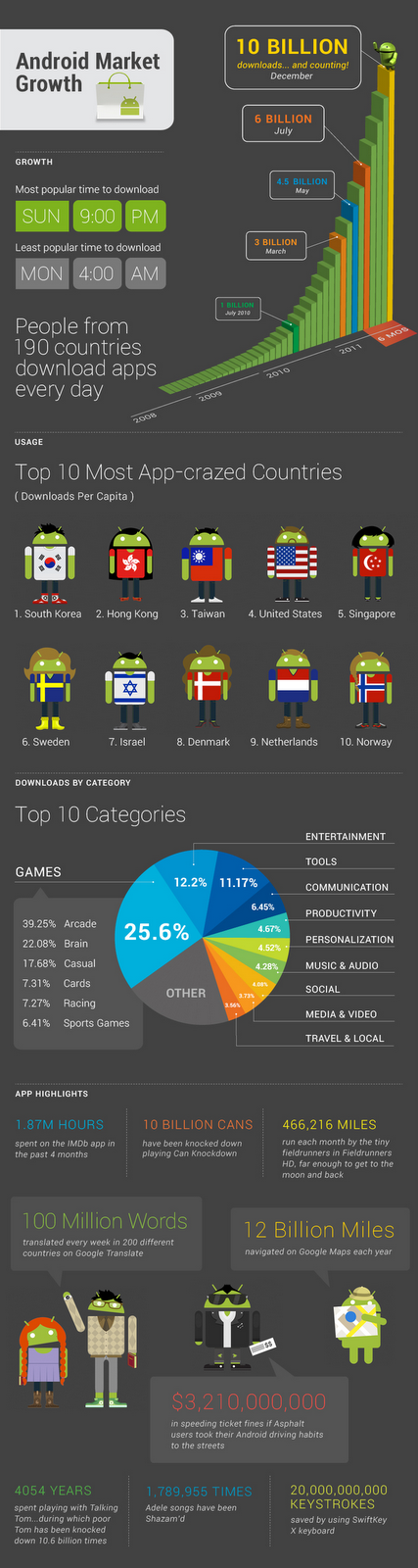
A Closer Look at 10 Billion Downloads


[This post is by Eric Chu, Android Developer Ecosystem. —Dirk Dougherty]


On Tuesday, we announced that Android Market passed 10 Billion app downloads. We wanted to look a little deeper at that huge number. First question: which app was lucky number 10 billion? Photobucket Mobile. They’ll be getting a great prize package, including tickets to next year’s Google I/O developer conference.


Remember we still have 8 days left to celebrate 10 billion downloads with 10-cent apps on Android Market. You can follow which apps are promoted each day on +Android, our Google+ page.


Here’s a graphical deep dive into 10 billion downloads...


Monday, November 28, 2011

Games Coming to Android Market in Korea


[This post is by Eric Chu, Android Developer Ecosystem. —Dirk Dougherty]


In the 24 months since the first Android device became available locally, Korea has quickly become one of the top countries in Android device activations. In parallel, we’ve also seen tremendous growth in app downloads from Android Market. Korea is now the second-largest consumer of apps worldwide. Today we are adding to this momentum by bringing games to Android Market in Korea.


Starting right away, Android users in Korea can explore the many thousands of popular game titles available in Android Market and download them onto their devices. For paid games, purchasing is fast and convenient through direct carrier billing, which lets users in Korea easily charge their purchases to their monthly mobile operator bills.


If you are a game developer, now is the time to localize your game resources, app descriptions, and marketing assets to take advantage of this new opportunity. When you are ready, please visit the Android Market developer console to target your app for distribution in South Korea and set prices in Korean Won (KRW). If you don’t want to distribute to Korea right away, you can also exclude it.


With the huge popularity of games on Android and the convenience of direct carrier billing in Korea, we expect to see a jump in game purchases and downloads in the weeks ahead. For game developers worldwide, it’s “game on” in Korea!

Tuesday, October 18, 2011

Tips Mengoptimalkan Smartphone Android

Saat ini sudah banyak teknologi yang terus semakinberkembang di dunia, terutama dalam bidang komunikasi, yaitu ponsel. Yang sekarangsedang menjadi trend dan booming adalah kehadiran Smartphone dan BlackBerry.Ponsel yang berbasis Android sangat disukai dan diidamkan oleh banyak orang,termasuk juga oleh saya, karena adanya banyak fitur dan layanan lainnya yangmenarik dan lebih bagus dari yang lainnya.

Namun ada sebagian orang yang sudah memilki smartphoneAndroid, tapi masih hanya digunakan seperti biasa pada umumnya tanpamenggunakan fitur yang dimiliki dalam layanan tersebut. Padahal di dalamAndoroid ada banyak yang menarik. Supaya kita yang memiliki Smartphone Androidbisa memanfaatkan sebaik-baiknya dengan optimal, ada beberapa hal yang dapatkita lakukan.


Sebagaimana yang kita ketahuibahwa Android merupakan OSatau sistem operasi dari Google, jadi kita membutuhkan email yang dari Googlealias Gmail buat menggunakan banyak fitur yang tersedia di dalam SmartphoneAndroid kita. Kalau kita belum punya, kita tinggal bikin aja di www.Gmail.com.kalau kita sudah punyaalamat Gmail, nantinya kita akan lebih mudah untuk mengakses fitur yang adakaitannya dengan Google, seperti Android Market misalnya.
Di Android Market, kita bakalan banyak menemukan aplikasiyang hampir semuanya keren. Untuk lebih seleksi dan menurut kita yang palingbagus, cara carinya cukup mudah kok, kita bisa mulai cari aplikasi dari yangratingnya tinggi. Secara logikanya kan, kalau aplikasi yang semakin banyakbintangnya pasti semakin bagus dibandingin yang lainnya, walaupun belum tentu absolute.


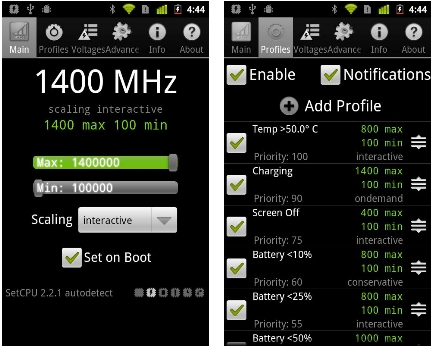
Saat kita sedang menggunakan Smartphone Android kita, adabaiknya jika kita mengaktifkan fitur Underclock, yaitu fitur yang dapatmembantu untuk menghemat penggunaan baterai kita sehingga baterai kita bisalebih irit.


Informasi di atas hanya sekian dari beberapa caramengoptimalkan Smartphone Android kita, jika Anda punya informasi lainnya,silahkan berbagi dengan kami….

Wednesday, October 5, 2011

Google Docs, Enhanced For Android Tablets


http://snapvoip.blogspot.com/
Google Docs team updated the Google Docs app for Android today to provide even better experience of Google Docs on your Android tablet. I was pretty pleased already how it behaved on my Asus EEE Pad Transformer but the new design makes it pleasure to work with. The Google DOcs team has customized the look to make the most of the larger screen space on tablets. The new layout consisting of a three-panel view, allows me to navigate through filters and collections, view your document list, and see document details, including a thumbnail preview of the document on one place.
No more opening of many documents before you find the right one.
All these are available in 46 languages on tablet devices with Android 3.0+ (Honeycomb) and above. Head over to the Android Market.

Wednesday, September 14, 2011

Smozzy : Browse The Web Without A Data Plan On Android Phones (Limited)


Smozzy : Browse The Web Without A Data Plan On Android Phones http://snapvoip.blogspot.com/
Once in a while an app comes along and you say "Hah" and Smozzy does that. Even though limited to T-Mobile network, the app which is in beta, allows one to browse the web without a data plan.
Smozzy does that by using you unlimited messaging plan via SMS and MMS, just like your Android browser does with a data plan.(Due to the large number of messages sent and received, it is recommended that those without an unlimited messaging plan not try this app)
So if you are on T-Mobile and have an unlimited data plan on either Nexus S or HTC G2 phones, head over to the Android Appstore, Android Market. If you want to join the discussion about the app, hacker news is the place.

Monday, September 12, 2011

More Carrier Billing Options on Android Market


[This post is by Eric Chu, Android Developer Ecosystem. —Dirk Dougherty]


Over the past year, we’ve seen very strong growth in the number of Android users around the world. To make it easier for those users to purchase their favorite apps and games on Android Market, we’re bringing Direct Carrier Billing to additional carrier networks in South Korea, the UK, and Germany.


In South Korea, we’ve begun a phased rollout of the service to users on the top two carrier networks — SK Telecom and KT Corporation. When complete, the rollout will reach more than 10 million users, who will be able to charge their Android Market purchases straight to their phone bills.


In Europe, we’re rolling out the service to users on two popular regional carriers, Vodafone UK and Vodafone DE. Initially, the service will be available only to users who have purchased their devices through Vodafone’s online and retail channels.


The new launches expand the network of carriers already offering direct billing service in the US on the T-Mobile, AT&T, and Sprint networks, and in Japan on SoftBank, KDDI, and NTT DOCOMO networks.


Direct Carrier Billing is a key payment option for users worldwide, especially in regions where credit cards are less common. We will continue to partner with more operators to offer this payment option to their Android users. Watch for more announcements in the weeks ahead.

Android Tethering (USB Tehtering), Without Hacking Your Phone, With PdaNet


Android Tethering, USB Tehtering, PdaNet http://snapvoip.blogspot.com/
If you ever thought of rooting your Android phone, just to get it tethered to your computer, laptop or notebook, you can skip the rooting step now, thnks to an app called PdaNet from June Fabrics. In addition to the USB, it also supports Bluetooth DUN. PdaNet once activated on your Android phone, shares what ever the Internet access it has with your computer. According to the authors, it works on all Android phones. The same source tells us that it is capable of handling download speed of well above 35Mbps (35000kbps) over USB.
You can find the app on Android Market. The desktop counterpart, Windows and Mac, could be downloaded from June Fabrics site.

Wednesday, August 10, 2011

Aplikasi Islam Quiz Menambah Wawasan


Di bulan Ramadhan ini, umat Islam sudah memiliki kewajiban untuk menunaikan ibadah Shaum Ramadhan atau berpuasa. Saat ini banyak orang yang memiliki anggapan bahwa selama puasa, lebih baik tidur, karena katanya tidurnya orang yang berpuasa itu merupakan ibadah juga. Tapi apa kita mau seharian terus tidur di kamar, lagian juga kurang baik untuk kesehatan.


Daripada tidur, lebih baik kita perkuat dan menambah wawasan kita tentang Islam dengan menggunakan aplikasi Islam Quiz. Aplikasi Islam Quiz merupakan suatu aplikasi yang berisikan kuis-kuis meliputi berbagai bidang di bidang agama Islam, sehingga kita jadi lebih memahami dan mengerti lebih dalam mengenai indahnya Islam.


Aplikasi Islam Quiz ini mungkin ibarat seperti game biasa aja, cocok untuk menemani waktu luang kita di saat kita berpuasa. Aplikasi ini dapat digunakan untuk ponsel Android 2.1 dan keatasnya. Aplikasi Islam Quiz ini terbilang salah satu aplikasi yang ringan, karena size nya hanya sekitar 493 Kb.


Pembuat aplikasi Islam Quiz ini adalah Amir Memon, seorang developer yang merancang aplikasi ini sehingga menjadi aplikasi keren seperti sekarang. Kalau kita ingin mencoba aplikasi Islam Quiz ini, kita bisa men-downloadnya di https://market.android.com/details?id=com.amirmemon.quizgame.islam&feature=search_result dalam Android Market.


Sayangnya aplikasi Islam Quiz ini nggak bisa kita download secara gratis karena aplikasi ini termasuk salah satu aplikasi berbayar. Harga aplikasi ini di Android Market adalah seharga $0.99 atau sekitar Rp 8,461. Kalau Anda berminat, apa salahnya mencoba aplikasi Islam Quiz ini di ponsel Android Anda...


Tuesday, August 9, 2011

Aplikasi iQuran Bernuansa Ramadhan


Perkembangan teknologi kini udah semakin canggih dalam berbagai bidang. Misalnya saja di bidang gadget, seperti Android atau ponsel lainnya. Biasanya umat muslim di suasana Ramadhan seperti sekarang ini banyak mencari ponsel yang ada nuansa Islami nya. Tapi nggak perlu ribet kok, sekarang udah ada aplikasi iQuran.


Aplikasi iQuran merupakan aplikasi yang membuat kita dapat mendengarkan suara ngaji tentang Al Qur'an. Aplikasi murotal Qur'an ini dapat mengeluarkan lantunan suaranya, baik melalui headset maupun speaker ponsel kita. Tampilannya pun berupa bahasa Arab dan terjemahannya dalam bahasa Inggris.


Pembuat aplikasi iQuran ini adalah Guided ways Technology Ltd. Perusahaan tersebut membuat aplikasi iQuran untuk minimal spesifikasi ponsel Android 1.6. Aplikasi iQuran menurut saya beratnya cukup ringan, karena size aplikasi tersebut hanya 7,8 Mb.


Jika Anda memiliki ponsel Android dan ingin merasakan sensasi Islam di bulan Ramadhan ini, Anda dapat mengunduh aplikasi iQuran tersebut di https://market.android.com/details?id=com.guidedways.iQuran&feature=search_result


Dan mengenai harganya, aplikasi iQuran ini gratis atau Free. Jadi jika Anda ingin mencobanya, silahkan langsung download aja di Android Market tersebut.


Selamat berpuasa ya.., ^_^


Thursday, July 21, 2011

Multiple APK Support in Android Market

[This post is by Eric Chu, Android Developer Ecosystem. —Dirk Dougherty]

At Google I/O we announced our plans to add several new capabilities to help developers manage their products more effectively in Android Market. We’re pleased to let you know that the latest of those, multiple APK support, is now available. Multiple APK support is a new publishing option in Android Market for those developers who want extra control over distribution.

Until now, each product listing on Android Market has included a single APK file, a universal payload that is deliverable to all eligible devices — across all platform versions, screen sizes, and chipsets. Broad distribution of a single APK works very well for almost all applications and has the advantage of simplified product maintenance.

With multiple APK support, you can now upload multiple versions of an APK for a single product listing, with each one addressing a different subset of your customers. These APKs are complete, independent APKs that share the same package name, but contain code and resources to target different Android platform versions, screen sizes, or GL texture-compression formats. When users download or purchase your app, Android Market chooses the right APK to deliver based on the characteristics of the device.

When you upload multiple APK files, Android Market handles them as part of a single product listing that aggregates the app details, ratings, and comments across the APKs. All users who browse your app’s details page see the same product with the same description, branding assets, screenshots, video, ratings, and comments. Android Market also aggregates the app’s download statistics, reviews, and billing data across all of the APKs.

Multiple APK support gives you a variety of ways to control app distribution. For example, you could use it to create separate APKs for phones and tablets under the same product listing. You could also use it to take advantage of new APIs or new hardware capabilities without impacting your existing customer base.

To support this new capability, we’ve updated the Developer Console to include controls for uploading and managing APKs in a product listing — we encourage you to take a look. If you’d like to learn more about how multiple APK support works, please read the developer documentation. As always, please feel free to give us feedback on the feature through the Market Help Center.

Tuesday, July 19, 2011

ANDROID diserang MALWARE !


 Anda punya ponsel Android? Jika ya, pastinya Anda
merupakan salah seorang penggemar gadget terbaru yang lagi trend teknologi nya.
Teknologi Android di ponsel ini merupakan salah satu trend yang lagi “booming”
sekarang ini selain trend 3D TV dan Smart TV di Indonesia.


Android merupakan system dalam ponsel yang tercanggih dan
terbaru. Teknologinya dapat dibilang sebagai high tech dengan berbagai dasar
atau system yang telah dirancang. Bahkan saya rasa sementara ini bisa aman dari
serangan malware karena tidak bisa menembus system Android ini. Sayangnya
dugaan saya salah, ternyata kini saya dengan berita bahwa sudah ada malware
yang bisa menjebol system pertahanan Android ini. Apa saja malware tersebut?


Malware tersebut antara lain adalah DroidDream Light dan
Zitmo. Malware varian DroidDream Light ini sudah dikenal sebelumnya oleh para
pengguna Android karena udah menyerang lebih dari seratus ribu ponsel Android.
Tentu saja para pengguna Android ini menjadi kesal akibat ulah malware
tersebut. DroidDream Light biasanya ada di aplikasi yang ada di Android Market
seperti Quick Falldown, Scientific Calculator dan beberapa aplikasi lainnya.


DroidDream Light tugasnya sering mengacaukan system yang
ada di ponsel tanpa ketauan kita. Malware ini sering download sendiri aplikasi
apa aja secara otomatis yang kemungkinan bisa merusak ponsel Android itu
sendiri.


Kalau malware Zitmo ini lebih kuat diatasnya DroidDream
Light, karena malware Zitmo bisa sampai mengambil password kita, bahkan
password rekening kita di Bank. Malware tersebut mampu melakukan transaksi
online tanpa kita sadari loh. Tapi jumlah ponsel yang katanya terkena malware
ini nggak sebanyak yang seperti malware DroidDream Light. Paling hanya sekitar
lima ribu ponsel Android saja yang baru terinfeksi malware tersebut.


Tentu saja serangan malware ini membuat kita sebagai
pengguna ponsel Android kurang nyaman. Mungkin untuk mencegahnya, sebaiknya
Google melakukan filter atau saring lagi buat aplikasi yang mau masuk di
Android Market, supaya bisa aman dari Malware.


Tuesday, July 12, 2011

A New Android Market for Phones

[This post is by Eric Chu, Android Developer Ecosystem. —Dirk Dougherty]

Earlier this year, we launched several important features aimed at making it easier to find great applications on Android Market on the Web. Today, we're very excited to launch a completely redesigned Android Market client that brings these and other features to phones.

The new Market client is designed to better showcase top apps and games, engage users with an improved UI, and provide a quicker path to downloading or purchasing your products. For developers, the new Android Market client means more opportunities for your products to be merchandised and purchased.

In the home screen, we've created a new promotional page that highlights top content. This page is tiled with colorful graphics that provide instant access to featured apps and games. The page also lets users find their favorite books and movies, which will help drive even more return visits to Market.

To make it fun and easy for users to explore fresh content, we've added our app lists right to the Apps and Games home pages. Users can now quickly flip through these lists by swiping right or left, checking out what other people are downloading in the Top Paid, Top Free, Top Grossing, Top New Paid, Top New Free, and Trending lists. To keep the lists fresh and relevant, we've made them country-specific for many of the top countries.


To help you convert visitors to customers, we’ve made significant changes to the app details page. We've moved the app name and price into a compact action bar at the top of the page, so that users can quickly download or purchase your app. Directly below, users can flip through screen shots by swiping right or left, or scroll down to read your app's description, what's new, reviews, and more. To help you promote your product more effectively, the page now also includes a thumbnail link to your product video which is displayed at full screen when in landscape orientation.

For users who are ready to buy, we've streamlined the click-to-purchase flow so that users can complete a purchase in two clicks from the app details page. During the purchase, users can also see a list of your other apps, to help you cross-sell your other products.

With a great new UI, easy access to app discovery lists, a convenient purchase flow, and more types of content, we believe that the new Market client will become a favorite for users and developers alike.

Watch for the new Market client coming to your phone soon. We've already begun a phased roll-out to phones running Android 2.2 or higher — the update should reach all users worldwide in the coming weeks. We encourage you to try the update as soon as you receive it. Meanwhile, check out the video below for an early look.

Wednesday, June 22, 2011

ANDROID mulai diserang TROJAN !!!


Saat ini kita banyak dengar kabar tentang ponsel-ponsel
dengan teknologi terbaru, seperti model Android salah satunya. Saya pikir
dengan teknologi terbaru tersebut, maka kita bisa aman dari serangan virus,
ternyata aman cuma buat sementara aja, soalnya sekarang juga ada kabar bahwa
katanya model Android ini udah bisa terinfeksi oleh virus.


Saya dengar info lebih lanjut dari berbagai sumber yang
mengatakan bahwa pada kuartal pertama di tahun 2011 ini sudah ada lebih dari 50
aplikasi Operation System (OS) pada Android yang terdeteksi berbahaya dan
didistribusikan melalui Android Market. Tentu saja aplikasi yang diciptakan
oleh penjahat dunia maya tersebut membuat kita sebagai para pengguna Android
menjadi resah.


Beberapa aplikasi yang berbahaya tersebut merupakan versi
re-packed dari software legal, tapi sudah ditambahin komponen Trojan berbahaya ke
dalam software tersebut. Jadi waktu kita instal aplikasi itu, maka secara
otomatis, virus Trojan nya bakal ikut ter-instal juga dan akhirnya akan menjadi
komponen virus Trojan tersebut.


Mungkin untuk mengatasi masalah akan virus tersebut, perusahaan
antivirus handal yang sering kita gunakan, yaitu Kaspersky menciptaan antivirus
khusus untuk handphone, yakni Kaspersky Mobile Security (KMS). Antivirus
tersebut support untuk windows mobile dan symbian. Sedangkan untuk BlackBerry
dan Android, kita bisa gunakan KMS 9.


Kaspersky Mobile Security ini bisa kita gunakan untuk
mendeteksi virus waktu kita lagi menginstal suatu aplikasi atau saat kita lagi
mau buka satu link. Kita sering liat ada link di Twitter, Facebook atau
BlackBerry Messenger. Kalau kita penasaran tentang link tersebut, maka kita
coba untuk membuka link tersebut. Soalnya kita nggak akan tahu link tersebut
berisi virus sebelum kita buka linknya. Tapi ternyata waktu linknya kita buka, ternyata
itu adalah komponen virus, dan komponen virus itu mulai mendownload virus utuh
secara lengkap.


Bagi Anda yang ingin mencoba antivirus Kaspersky Mobile
Security ini secara free trial, Anda bisa buka di http://kms.kaspersky.com dari handphone
Anda. Tapi kalau mau yang premium, maka Anda bisa berlangganan dengan biaya
sebesar Rp.100 ribu per bulan. 


Monday, June 20, 2011

Things That Cannot Change

[This post is by Dianne Hackborn, whose fingerprints can be found all over the Android Application Framework — Tim Bray]

Sometimes a developer will make a change to an application that has surprising results when installed as an update to a previous version — shortcuts break, widgets disappear, or it can’t even be installed at all. There are certain parts of an application that are immutable once you publish it, and you can avoid surprises by understanding them.

Your package name and certificate

The most obvious and visible of these is the “manifest package name,” the unique name you give to your application in its AndroidManifest.xml. The name uses a Java-language-style naming convention, with Internet domain ownership helping to avoid name collisions. For example, since Google owns the domain “google.com”, the manifest package names of all of our applications should start with “com.google.” It’s important for developers to follow this convention in order to avoid conflicts with other developers.

Once you publish your application under its manifest package name, this is the unique identity of the application forever more. Switching to a different name results in an entirely new application, one that can’t be installed as an update to the existing application.

Just as important as the manifest package name is the certificate that application is signed with. The signing certificate represents the author of the application. If you change the certificate an application is signed with, it is now a different application because it comes from a different author. This different application can’t be uploaded to Market as an update to the original application, nor can it be installed onto a device as an update.

The exact behavior the user sees when installing an application that has changed in one of these two ways is different:

  • If the manifest package name has changed, the new application will be installed alongside the old application, so they both co-exist on the user’s device at the same time.

  • If the signing certificate changes, trying to install the new application on to the device will fail until the old version is uninstalled.

If you change the signing certificate of your application, you should always change its manifest package name as well to avoid failures when it’s installed. In other words, the application coming from a different author makes it a different application, and its package name should be changed appropriately to reflect that. (Of course it’s fine to use the same package name for the development builds of your app signed with your test keys, because these are not published.)

Your AndroidManifest.xml is a public API

More than just your package name that is immutable. A major function of the AndroidManifest.xml is essentially to declare a public API from your application for use by other applications and the Android system. Every component you declare in the manifest that is not private (that is whose android:exported state is true) should be treated as a public API and never changed in a way that breaks compatibility.

A subtle but important aspect of what constitutes a break in compatibility is the android:name attribute of your activity, service, and receiver components. This can be surprising because we think of android:name as pointing to the private code implementing our application, but it is also (in combination with the manifest package name) the official unique public name for that component, as represented by the ComponentName class.

Changing the component name inside of an application can have negative consequences for your users. Some examples are:

  • If the name of a main activity of your application is changed, any shortcuts the user made to it will no longer work. A shortcut is an Intent that directly specifies the ComponentName it should run.

  • If the name of a service implementing a Live Wallpaper changes, then a user who has enabled your Live Wallpaper will have their wallpaper revert to the system default when getting the new version of your app. The same is true for Input Methods, Accessibility Services, Honeycomb’s new advanced Widgets, and so on.

  • If the name of a receiver implementing a Device Admin changes, then as with the live wallpaper example, the device admin will be disabled when the application is updated. This also applies to other kinds of receivers, such as App Widgets.

These behaviors are an outcome of how the Intent system is used on Android. There are two main kinds of Intents:

  • Implicit Intents only specify “what” they should match, using actions, categories, data, MIME types, and so on. The exact components that they will find are only determined at run-time, by the Package Manager matching it against the current applications.

  • Explicit Intents specify a single explicit “who” they should match, through a ComponentName. Regardless of whatever else is in the Intent, it is only associated with the exact manifest package name and class name as given in its ComponentName.

Both of these types of Intents are important to how Android interacts with your application. A typical example of this is how users browse and select live wallpapers.

To let the user pick a live wallpaper, the first thing Android must do is show them a list of the available live wallpaper services. It does this by building an implicit Intent with the appropriate action for a live wallpaper and asking the Package Manager for all services that support this Intent. The result is then the list of live wallpapers shown to the user.

When the user actually selects a specific live wallpaper they want to use, however, Android now must build an explicit Intent that identifies that particular live wallpaper. This is what is handed to the WallpaperManager to tell it which wallpaper to show.

This is why changing the name of the component in your manifest will cause the wallpaper to disappear: the explicit Intent that was previously saved is now invalid because the ComponentName it references no longer exists. There is no information available to indicate what the new name of the component is. (For example consider if your application had two different live wallpaper services the user could select.) Instead, Android must treat that live wallpaper as uninstalled and revert to its default wallpaper.

This is how input methods, device administrators, account managers, app widgets, and even application shortcuts work. The ComponentName is the public unique name of the components you declare in your manifest, and must not change if they are visible to other applications.

In conclusion: There are some parts of your application that can not change. Please be careful.

Monday, June 13, 2011

Google Removes Another Bunch Of Plankton Infected Apps From Android Market

Google Removes Plankton Infected Apps http://snapvoip.blogspot.com/
Infection by malware has forced Google to remove ten more apps from the Android Market. The Spyware delivered by various means installs a code known as Plankton on Android devices. The code was detected  and reported by Xuxian Jiang, an assistant professor at North Carolina State University's Department of Computer Science.
Earlier this month, Google removed Apps infected by another malware, DDLighr or DroidDream.
"While continuing an Android-related research project after the discovery of the DroidKungFu and YZHCSMS malware, my research team also came across a new stealthy Android spyware in the Official Android Market. This spyware does not attempt to root Android phones but instead is designed to be stealthy by running the payload under the radar. In fact, Plankton is the first one that we are aware of that exploits Dalvik class loading capability to stay stealthy and dynamically extend its own functionality. Our investigation indicates that there are at least 10 infected Android apps in the Official Android Market from three different developers. Its stealthy design also explains why some earlier variants have been there for more than 2 months without being detected by current mobile anti-virus software. " Jiang wrote in his article on the subject.
Webroot Threat blog also wrote about the Plankton after their analysts Andrew Brandt and Armando Orozco investigated the Plankton and discovered that it mostly taking advantage the popular game series Angry Birds. "Some of the samples we looked at came as Android apps with names like Angry Birds Rio Unlocker v1.0, Angry Birds Multi User v1.00 or Angry Birds Cheater Trainer Helper V2.0," they wrote on Threat Blog. According the the researchers, detecting the code was not a major issue and the way it was installed makes it easier to remove the code from the phone.
The developers of the malare developers are elusive at the moment. Always exercise care when you get new apps.

Tuesday, April 26, 2011

Merchant Sales Reports on Android Market

[This post is by Eric Chu, Android Developer Ecosystem. —Dirk Dougherty]

As part of our ongoing efforts to provide better tools to help you manage your business, we are introducing merchant sales reporting on Android Market. Developers now have convenient access to monthly reports that detail the financial performance of their applications directly from the Android Market Developer Console.

Based on Google Checkout financial data, these reports provide per-transaction details including additional information such as device information, currency of sale, and currency conversion rate. Developers will be able to easily download these reports as a CSV (comma-separated values) files to enable further analysis at their convenience.

Starting today, developers can download merchant sales reports for March 2011 from the Developer Console. Reports for months going back to January 2010 will be available in the coming weeks. Moving forward, sales reports for each month will be available by the 10th day of the following month.

We hope you’ll find these new sales reports useful. As always, please don’t hesitate to give us feedback through Market Help Center.

Wednesday, April 13, 2011

New Carrier Billing Options on Android Market


[This post is by Eric Chu, Android Developer Ecosystem. —Dirk Dougherty]

Since last year, we’ve been working to bring the convenience of Direct Carrier Billing to more Android Market users on more carrier networks. Building on the launches to T-Mobile US and AT&T users in 2010, we’ve recently launched Direct Carrier Billing to users on three popular networks in Japan -- SoftBank, KDDI, and NTT DOCOMO.

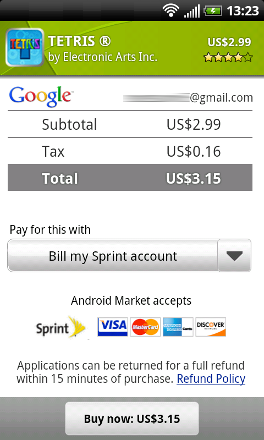
The momentum continues and today we’re excited to announce that Direct Carrier Billing is now available on Sprint. We've begun a phased roll-out of the service that will reach all users in the next few days. When complete, Android users on the Sprint network will be able to charge their Android Market purchases to their Sprint mobile bill with only a few clicks.

We believe that Direct Carrier Billing is a key payment option because it lets users purchase and pay for apps more easily. It’s also important because it offers a convenient way to buy in regions where credit cards are less common.

We are continuing to partner with more carriers around the world to offer carrier billing options to their subscribers. Watch for announcements of new payment options coming in the months ahead.