Showing posts with label Samsung Android Phone. Show all posts

Monday, December 26, 2011

Things You Must Know Samsung Galaxy S II Duos Support CDMA and GSM

samsung galaxy s 2 DuosThings You Must Know Samsung Galaxy S II Duos Support CDMA/GSM Samsung has released the latest variant of the Samsung Galaxy S II Duos. Known as the Samsung Galaxy S II Duos, the latest Android smartphone has support for dual nertwork CDMA and GSM.


Samsung Galaxy S II Duos use display 4.52 inch AMOLED WVGA Super Plus screen with dual-core processor 1.2 GHz. Although Samsung has not provided details of the chipset that is used but the clock speed of the CPU indicates the Samsung Galaxy S II Duos will be run by Exynos chip modification.

Samsung Galaxy S II Duos with dual-SIM Samsung released for the Chinese market and features an 8 MP camera on the back with 1080p video. At the front there is a 2 MP camera for video calls. SGS2 Duos running Android 2.3 Gingerbread current release and is expected to get an upgrade to the latest version of Android Ice Cream Sandwich.

SGS2-duos-01SGS2-duos-03 SGS2-duos-02  SGS2-duos-06
Like the original SGS2, Duos version also features Wi-Fi connectivity, GPS, Bluetooth, microUSB and 3.5mm audio jack. 16GB of onboard storage can be expanded to 32GB via microSD card slot.
Compared to the original SGS2, Galaxy S II Duos slightly thicker (9.8 mm) and heavier (132 g). This is supported by battery power is also greater this is the new Samsung Galaxy S II Duos Support CDMA and GSM

Things You Must Know Samsung Galaxy Xcover that is a waterproof and resilient phone?

Samsung-Galaxy-Xcover-1Samsung finally issued Galaxy Xcover series  that is intended for users who have an adventurous spirit and frequent outdoor activities but still want to perform with style and technology up-to-date.


Samsung Galaxy Xcover claimed can stay alive even if submerged to a depth of 1 meter of water for half an hour and is also durable, dust and mud problems, as evidenced by a certificate given to the mobile phone IP67.


In terms of technology "Specifications Samsung  Galaxy Xcover " is not inferior to its predecessor, this phone will use the Android OS Gingerbread, 3.6-inch LCD screen scratch-resistant, 3.2 MP camera LED flash and HSDPA 7.2 Mbps connection.

Harga-Samsung-Galaxy-XCover-HP-Android-Terbaru-dari-Samsung
But unfortunately this new phone will be present in Germany and Ukraine as well go on sale to the market in October 2011. Prices and specifications Samsung Galaxy Xcover detail yet to be announced by the Samsung.

Things You Must Know to new Samsung Galaxy S III design.

galaxy s IIIThings You Must Know to new Samsung Galaxy S III design, News of the third generation of Samsung Galaxy S has long been audible but until now has not appeared his form. Had also circulated the video concept SGS3 Android made ​​by fans.


Well, you see now is NOT the Samsung Galaxy III from Samsung but the results of rendering the concept of an Android smartphone made ​​by a reader of Russian-language website, Concept-Phones.


Regardless of whether this concept will be like the Samsung Galaxy III or not, but it must be admitted this design is pretty cool. Even with image rendering is also included detailed specifications covering the 5-inch display and use of Android and diferent OS.


With Android 4.0 Ice Cream Sandwich and quad-core 1.5GHz processor (Samsung Exynos 4412) the designers have also included 5 that makes TouchWiz UI looks cool as you can see on the homescreen.

Samsung_Galaxy_S_III_I9500_2
By using 1280 x 720 pixel resolution and HD Super AMOLED technology, Samsung's concept of Galaxy S III has a thickness of only 9mm. There is a 12 MP camera in the rear with LED and Xenon flash and a 2 MP camera on the front. The designers hope that the Galaxy S III will have the option 32/64GB internal memory and a card slot microSDXC. Other features include accessories stylus, support 4G LTE, NFC, USB 3.0 and a metallic case.

Samsung_Galaxy_S_III_I9500-BIG
Well, every Android fans may be asking a variety of features exist in the Samsung Galaxy S III but certainly only Samsung who have the authority to determine how the concept of the Galaxy S III later.

Easy Ways to root samsung galaxy tab 7 with SuperOneClick.

Samsung Galaxy Tab 7 androidIf you recently bought a Samsung Galaxy Tab 7, confused and know how to root Samsung Galaxy Tab 7? Now I Can sharing the following Easy Ways to Root Samsung Galaxy Tab 7 with SuperOneClick.

There is an application called z4root that will help you rooting Samsung Galaxy Tab 7. Although today you no be able to find z4root in the Android Market, but you can still find it on the internet. However z4root no longer support some version of the Samsung Galaxy Tab 7. For that you can do the steps as below.


Ok, before you start rooting completeness please prepare the following:
- Samsung Galaxy Tab 7
- USB Cable
- Samsung Galaxy Tab drivers
- SuperOneClick
- Windows Computer with USB port
- Android Terminal Emulator (free on Android Market)


CAUTION: rooting could endanger the Galaxy Tab and you are responsible for everything that might happen. If not sure I can run it, do not.

If you are sure, let's get started:

View the Galaxy model that you wear on the back. For example: SPH-P100. After learning the model, please look for drivers on the Samsung support site. If you've found the appropriate driver, please download and install on your computer.

Next download, install SuperOneClickv1.7-ShortFuse.zip and extract on desktop.

Before installing the USB cable, turn on the first Galaxy Tab 7. Go to Settings > Applications > Development then enable USB debugging. If you already installed the USB cable is the USB debugging can not be activated unless you disconnect the cable. Once active, please plug the USB cable and computer GTab.


Now open the folder on the desktop SuperOneClick that you have previously installed and run SuperOneClick.exe. You will see a small icon shaped shield. The emergence of the icon it means you have to run with admin approval. Double click on the icon and enter the necessary data.

superoneclick-v14
Now you're looking for Root button, click and wait.
root

Scan subsequently appeared several notifications. At this stage it appears a notice that the rooting process is successful. Click YES to test and install applications Superuser. Next you will be asked to reboot GTab prior to root successfully. Please disconnect the USB and reboot.
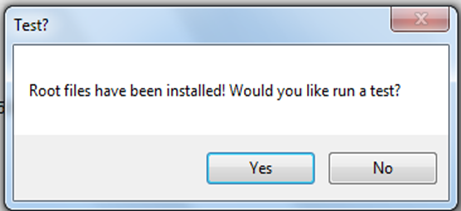
testreboot

Done! Gtab 7 has been successfully rooted. You can test it using Android Terminal Emulator (can be obtained in the Android Market). Of the $ prompt, type su and hit enter. Superuser will tell you to 'Allow' command. Select Allow and you'll get a root (#) prompt! It worked!
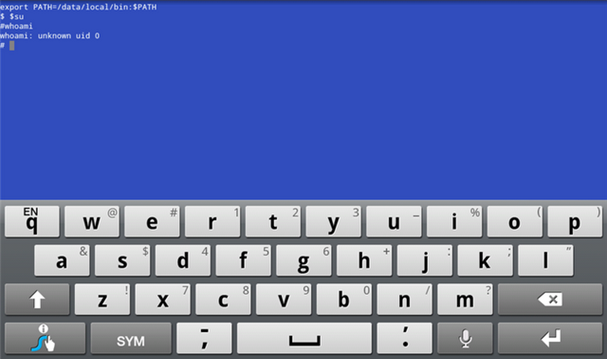
root-success

That's Easy Ways to Root Samsung Galaxy Tab 7 with SuperOneClick hopefully this article can be useful

Tuesday, December 20, 2011

Samsung Galaxy S II Ensure Get Android Ice Cream Sandwich as the operating system

samsung galaxy sII_ 1androidphone.blogspotin the previous period Motorola and Sony Ericsson has confirmed what devices are going to get an upgrade to the Ice Cream Sandwich, now turn a promising Samsung Android 4.0 Ice Cream Sandwich to the Galaxy S II. Motorola and Sony Ericsson has confirmed what devices are going to get an upgrade to the ICS, now turn a promising Samsung Android 4.0 Ice Cream Sandwich to the Galaxy S II.


From the Samsung UK Twitter account, Samsung ensures Galaxy S II will get an upgrade to the latest version of Android Ice Cream Sandwich. But Samsung has not specifically provide upgrades Ice Cream Sandwich when it will be downloaded by the owner of the Galaxy S II.

When the release of the Samsung Galaxy S II running Android 2.3 Gingerbread platform combined with TouchWiz technology UX. Moreover you can get HSPA connectivity for data transfer up to 21Mbps. Likewise with HSUPA which has a data transfer speed of 5.76 Mbps. Other features include an 8MP camera with 1080p full HD camcorder. There was also a 2MP camera for video calls. On the front you can see the display width of 4.3-inch Super Plus AMOLED capacitive touchscreen. Not only that, the display is also coated with Gorilla Glass for protection against scratches and stains.

To be sure, you choose the Samsung S2 Galaxy Ice Cream Sandwich who want to feel, a little patience waiting for the release of Ice Cream Sandwichfrom Samsung for the Galaxy S II. Or, while waiting for the official ICS from Samsung You can try the Android 4.0 Ice Cream Sandwich MIUI ROM.